.png?width=100&height=75&name=PETALFAST_Logo-navy%20(1).png)
Each state has their own dashboard accessible via these links that showcases all in store visit logs and activations logged into Pinata. This information shows everything going on for F+T that is relevant to a sales rep. The two reports on this page have different data associated, so remember each needs their own filters applied!
AZ Dashboard: https://app.hubspot.com/reports-dashboard/21785266/view/11428947
MA Dashboard: https://app.hubspot.com/reports-dashboard/21785266/view/11428935
CA Dashboard: https://app.hubspot.com/reports-dashboard/21785266/view/10931727
Listen champ, before you go to town on your dashboard, some things to know about the filters:
The top report and bottom report run on different filters for now, but good news is they are easily found on top of your dashboard:
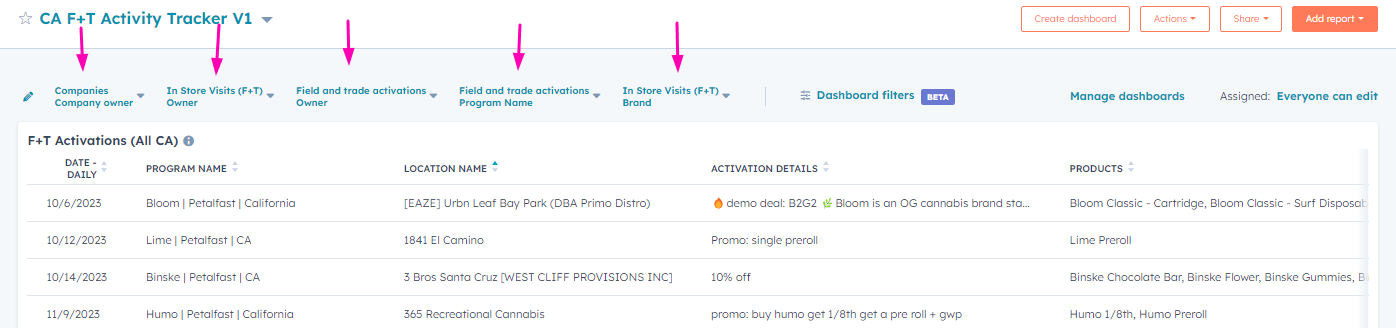
Companies Company Owner:
Select "is any of" and choose your own name or "Me"
In Store Visits (F+T) Owner
Select "is any of" and choose the F+T rep(s) that is relevant to you.
Field and trade activations Owner
Select "is any of" and choose the F+T rep(s) that is relevant to you
Field and trade activations Program Name
Select "contains any of" and type what brands you want to filter for
In Store Visits(F+T) Brand
Select "is any of" and choose what brands you want to filter to
But Sam I need to search by Store name, that's like a must, must, MUST for me.
You can! Click on the dashboard filters

Now type in location and click on Location Name
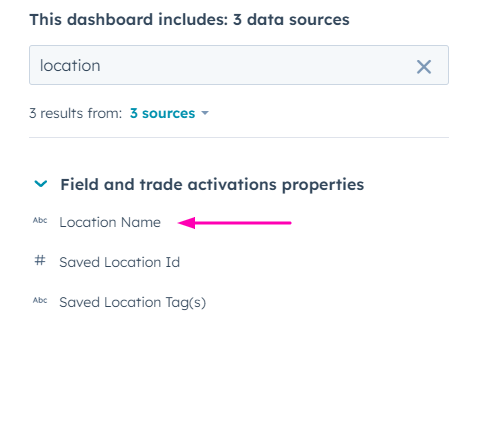
Now select "Contains any of" and type the name of your store to filter for.

Repeat the same for "company name" for filtering by store on the In Store Visits Table.
