.png?width=100&height=75&name=PETALFAST_Logo-navy%20(1).png)
App is updated but you're not seeing the updated changes in the web version of the app
-
- The web version of the app, since Google likes to keep users logged in, typically gets stuck on a previous version of the app and doesn't automatically sync and the refresh button also doesn't help, so the user needs to log out and log back in for it to refresh to the latest version.
- The mobile version of an appsheet app is pretty good with automatically synchronizing changes every 30 minutes.
I want to add user access for a particular app
This is a two-step process
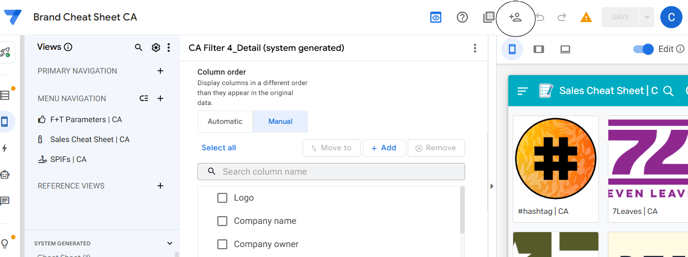
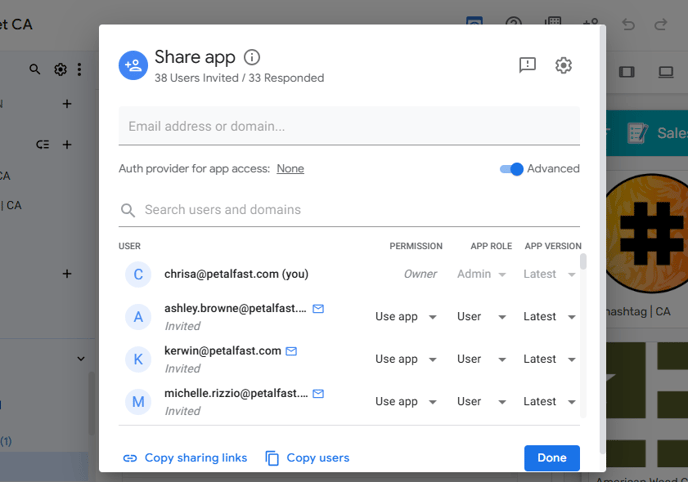
- Share the app with the Petalfast email of the user being added.
-
-
-
- Permission: 'Use app'
- App Role: 'User'
- App Version: 'Latest'
-
-
2. Update the Appsheet User Table
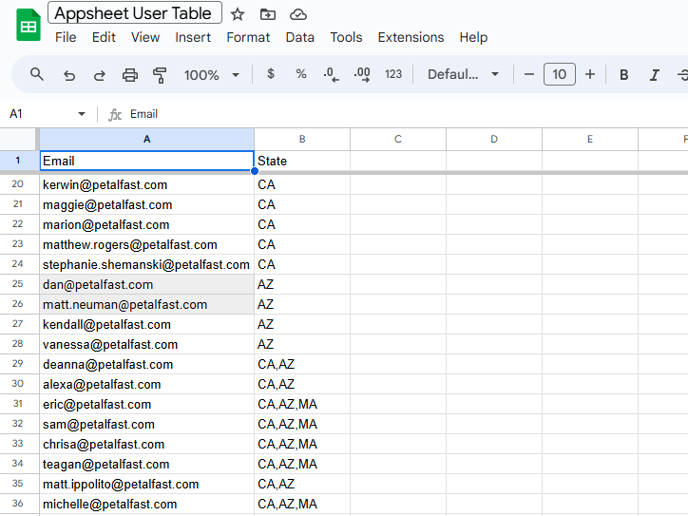
In column A, enter the Petalfast email the user will be using to log in to the app. In column B, specify the state they need access to with the abbreviation ("CA" for California, "AZ" for Arizona, etc.). If they need access to multiple states, separate the state abbreviations with a comma with no spaces.
A brand is missing from the dropdown in Appsheet
The following need to be true in order for the brand to appear in the dropdown